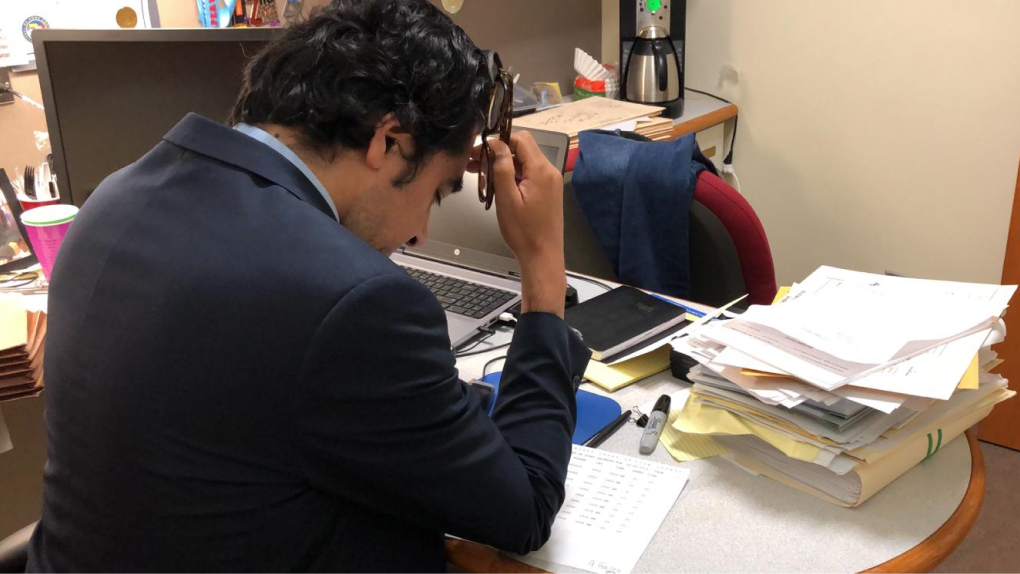
An unofficial passion project born from watching my sister, a public defender herself, navigate an entirely paper-based courtroom system. Discovery interviews with her colleagues led to user stories, workflows, and wireframes for a population rarely considered in product design.
Overview
Turning courtrooms digital
My sister is a criminal defense attorney working as a public defender. I'm constantly surprised how much the county still relies on paper, with printouts covering every surface, laptops shut off, information scattered across disconnected systems.
This project is an attempt to give courtroom attorneys, especially public defenders, a simple tablet app to keep track of their cases. Public defenders carry up to 10 times as many clients as a private attorney, making the cost of disorganization far higher than in any private practice.
The core problem
"Public defenders are among the most skilled attorneys in the room. The systems around them are designed for paper, however, creating a bottleneck compared to the pace at which they must work."
This app assumes enterprise-wide access to the same data used by courts, sheriffs, prosecution, and defense; making it a coordination tool, not just a personal organizer.
Research & discovery
Talking to the people in the room
I interviewed multiple colleagues of my sister, public defenders working in active courtrooms, to understand their day-to-day workflow and pain points. The conversations revealed a population under enormous time pressure, deeply skilled at reading their environment, but hampered by fragmented information and paper-based processes.
A recurring theme: when attorneys cover for a colleague, move courtrooms, or handle holiday bond court, there's a frustrating learning curve and communication barrier. The knowledge they need exists somewhere. It's just not accessible in the moment they need it.
User stories
As an attorney for the defense, I want…
- 01 A calendar of appearances in my assigned courtroom so I can manage my time wisely.
- 02 A description of each case and my client's background (including new charges) so I can serve them appropriately and efficiently.
- 03 The ability to add my own notes for personal memory and to communicate with my partner or investigator.
- 04 Quick access to exact law and sentencing ranges so I can respond immediately when I receive new clients.
Wireframes
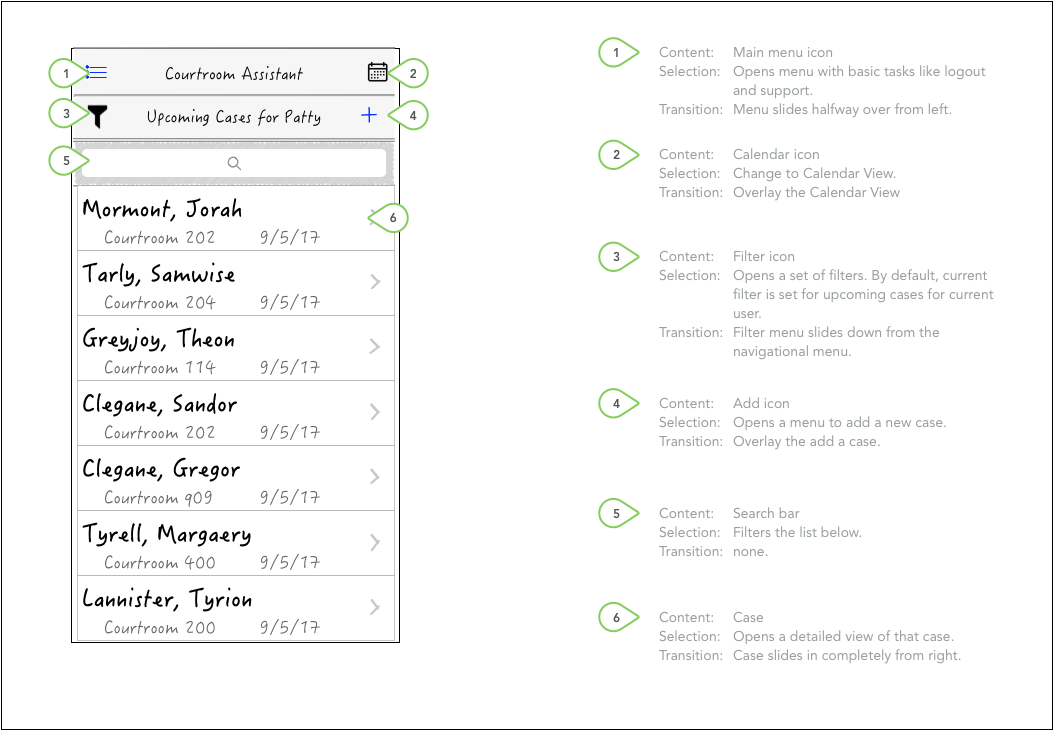
Core flows
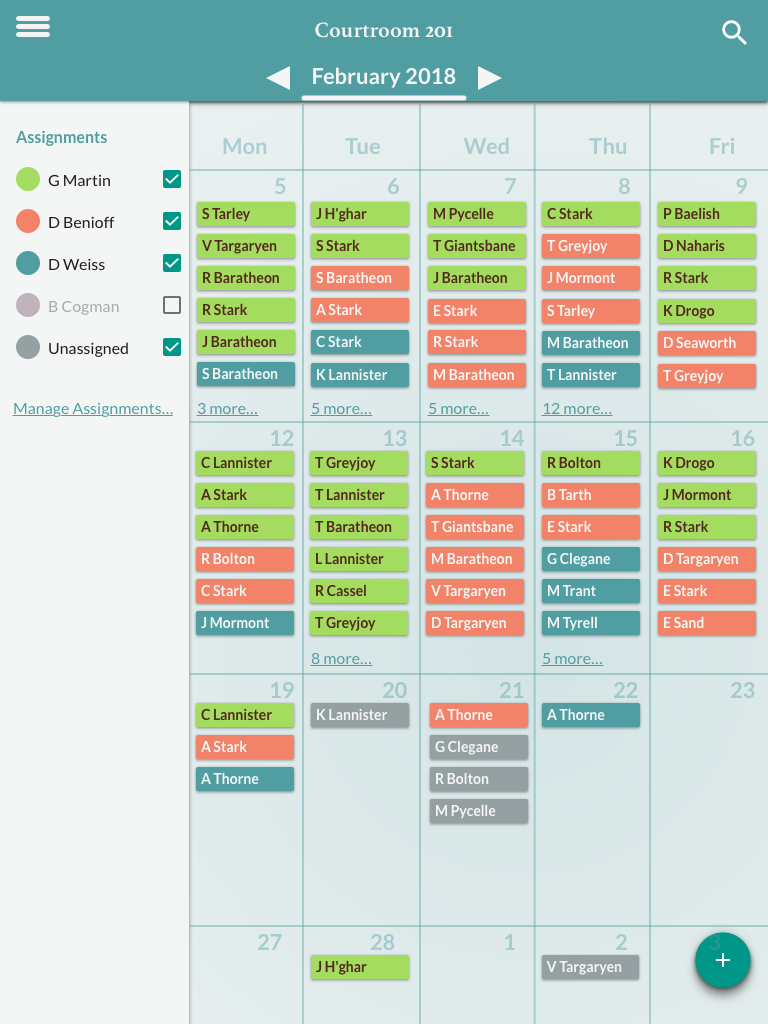
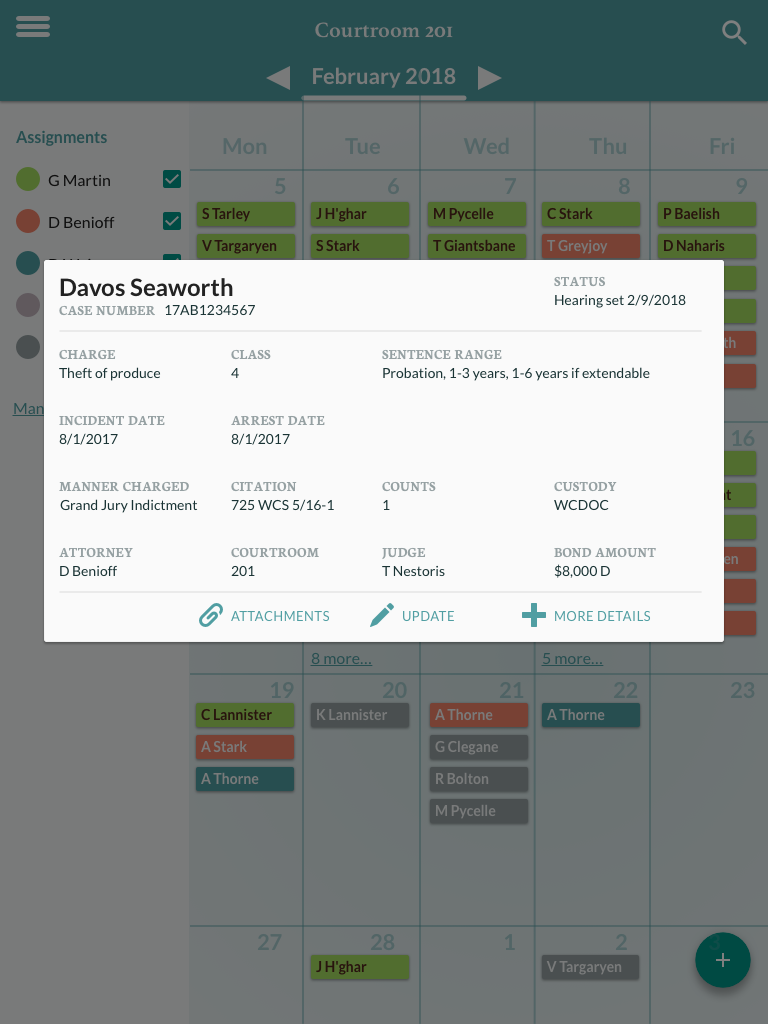
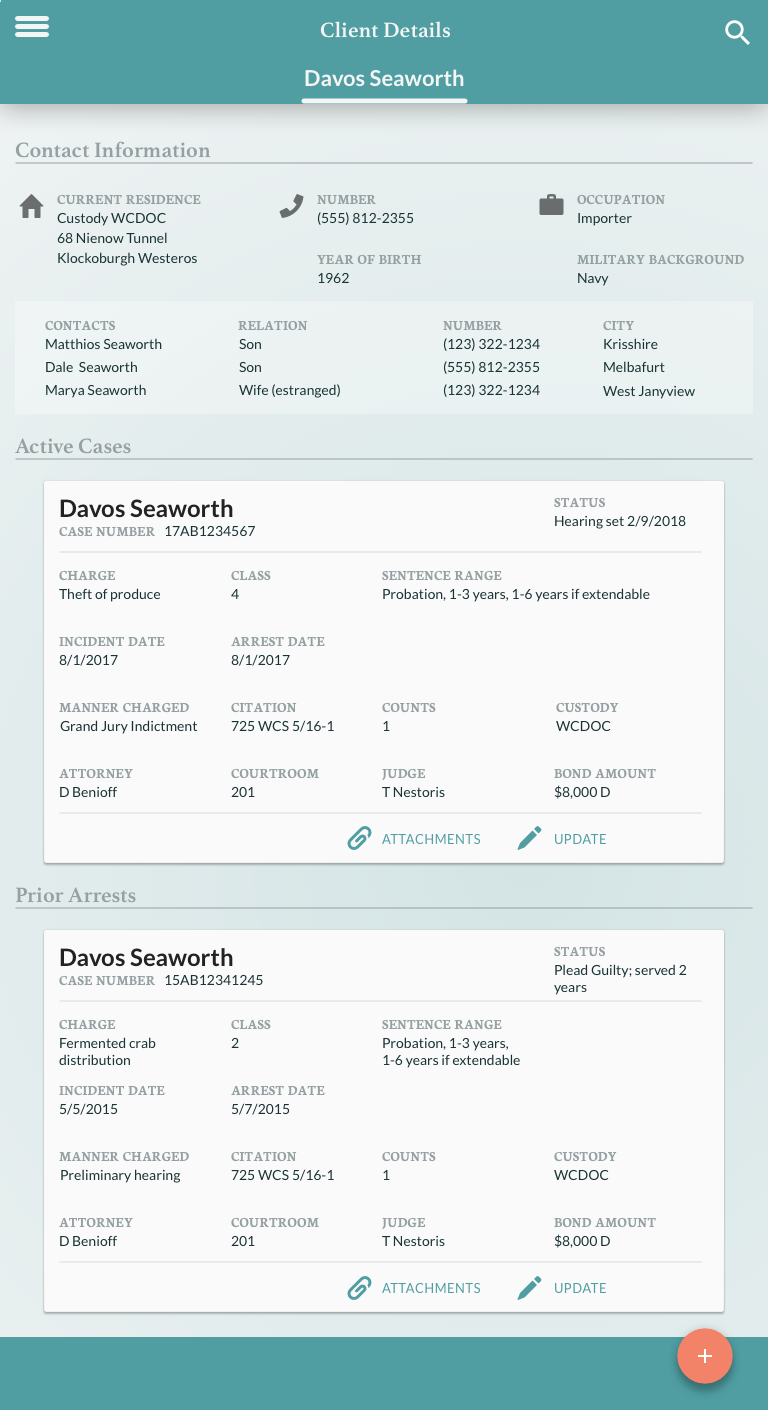
Client details
Everything an attorney needs, before they stand up
The client detail view surfaces case history, current charges, notes from the attorney and their team, and quick access to relevant statutes and sentencing ranges...all in one place, on a tablet they can carry into the courtroom.
The design prioritizes speed and scannability. Attorneys in active courtrooms can't scroll through dense text - they need to find what they need in seconds.
Outcome
A concept worth revisiting.
4
Core user stories validated through attorney interviews
↑10x
Caseload of a public defender vs. private attorney
0
Existing digital tools designed specifically for this workflow
This remained an unofficial project: no client, no engineering team, no ship date. But the research was real, the user stories were validated, and the problem is still unsolved. The county courtroom system is still largely paper-based.
Revisited on ServiceNow
The same problem on an enterprise platform, this time for the desk
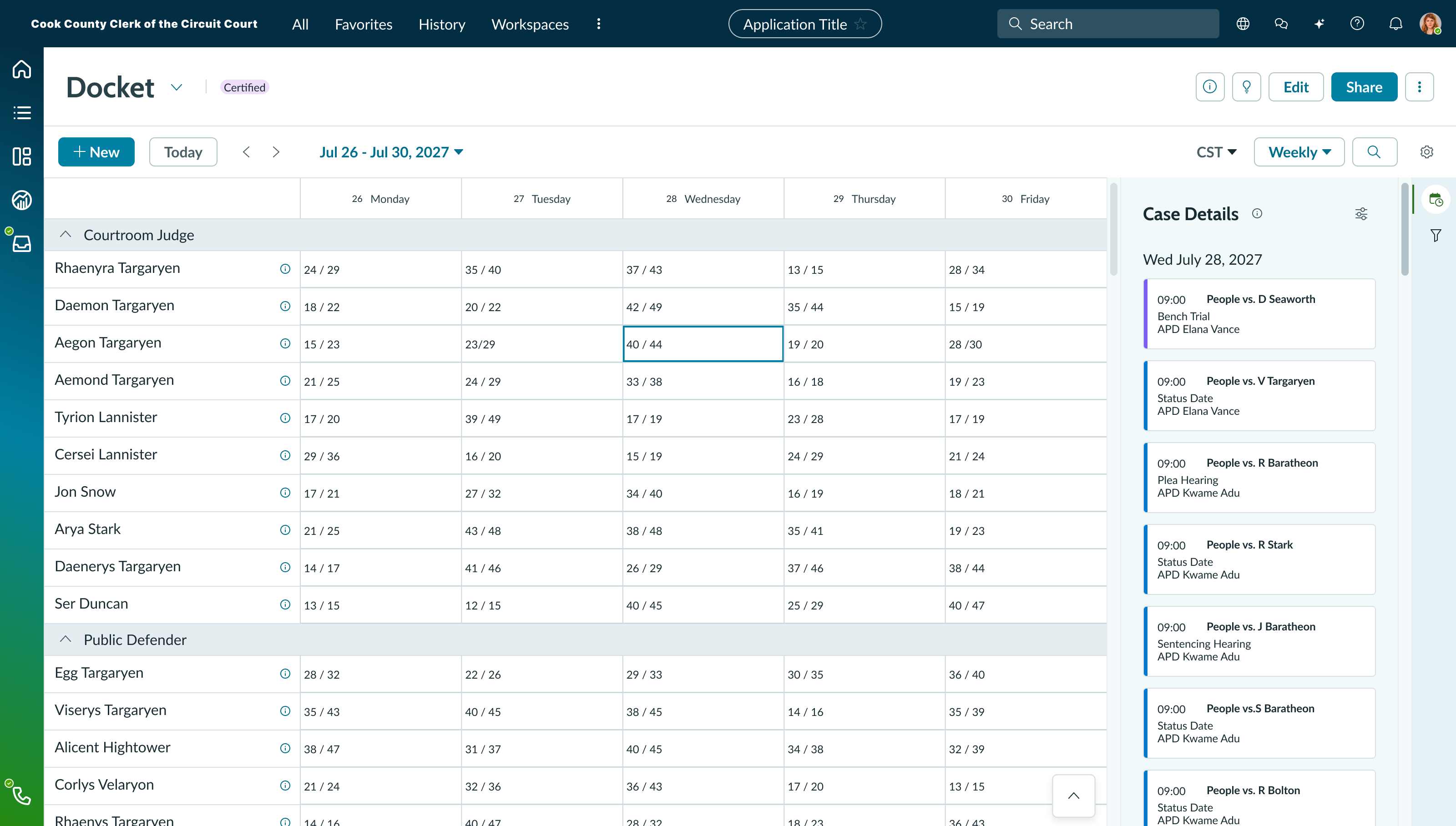
I came back to this on my own to see what the concept looks like built on ServiceNow rather than as a custom tablet app. It's a different exercise: instead of drawing screens freely, the work becomes fitting the courtroom's workflow into an existing enterprise platform, its workspace shell, its record model, and its design system.
The most useful thing the shift surfaced was who the tool is for at any given moment. The tablet concept is a personal organizer an attorney carries into the room. This is desktop, not mobile — a dense, multi-pane docket meant for a desk before court, showing the whole week across every courtroom judge and public defender at once, with the day's hearings and assigned APDs in a panel alongside. It's the coordination view the original concept assumed but never actually drew.
Reflection
Still revisiting it
This one never really closed. The ServiceNow docket above is the most recent pass at it, and I keep coming back to the problem — the gap between what these attorneys need and what exists is as wide as it was when I started. What I want next is something working rather than another set of screens: with Claude Code and AI-assisted prototyping, it's realistic to build a version fast enough to put back in front of real public defenders and get meaningful feedback.
The piece I keep circling is the fast-paced, fragmented nature of the public defender's work — there are conversations in hallways, at the back of courtrooms, phone calls out of the blue from a client's family (at all hours of the 24-hour day) to discuss statuses and "what-ifs." This lends itself best to a phone, suggesting ServiceNow's mobile experience rather than another desktop workspace. A lot of what an attorney needs during those fragmented client meetings isn't an enterprise solution at all; it's calendars and quick time-and-date answers under time pressure.
One example of this: a judge or the state's attorney might propose a plea deal of x months or years for a sentence. This always includes time spent in custody. PDs need to identify and communicate this deal to clients and their families:
- 01 Estimated time the client will be in prison, accounting for days already spent in custody awaiting trial.
- 02 Potential parole credits from the prison for good behavior.
"Your sentence is 3 years, and you've already served 6 months of that. You could get out in 2 years if you don't get into trouble while you're in prison."
That should be something an attorney can ask the system and trust the answer to, not work out on the back of a folder combining multiple sources of information.
The deeper lesson from this project: the most underserved users are often the ones no product team ever talks to. Public defenders don't have a procurement budget or an enterprise sales contact. But the design problems they face are as complex and consequential as anything in fintech.